General information for hospital buyers. It is not legal, tax or medical advice. Verify statutory rules with a qualified professional.
What hospital administration software means
Hospital administration software covers the work that keeps a hospital running but is not clinical. It has five parts: people (attendance, shifts, leave and payroll), materials (stores, purchase and stock), money (ledgers, receivables and reports), control (approvals and access) and quality (incidents and audit evidence). A clinical system looks after the patient. This side looks after everything the patient's care depends on.
The phrase gets used in three different ways, and vendors mix them up:
- A back office suite. HR, payroll, stores and accounts sold together, often with no link to patient records.
- The administrator's side of a full hospital system. Dashboards, occupancy, revenue, approvals and quality tracking that read from the same data as billing and OPD.
- A single purpose tool. A payroll app or a stock register bought on its own to fix one pain.
Ask which one you are being offered. Our hospital management software page describes the whole product. This page is about the administration half, and about how to judge it.
Why separate tools cost more than they seem to
A payroll app does not know which nurses worked night shifts in a month unless someone types the roster into it. A stock register does not know what a ward consumed for admitted patients unless the pharmacy or the ward enters it a second time. An accounts package does not know that a bill was raised at the counter until someone posts it. Every handover between tools is a place where numbers drift, and month end becomes a week of reconciling instead of a day of reviewing.
The alternative is one database that every function reads and writes. In a shared database, a leave approved by a manager can change the salary calculation, an approved purchase order can be matched to the goods received, and the goods received note can feed the amount owed to the vendor. Nobody types the same fact twice.
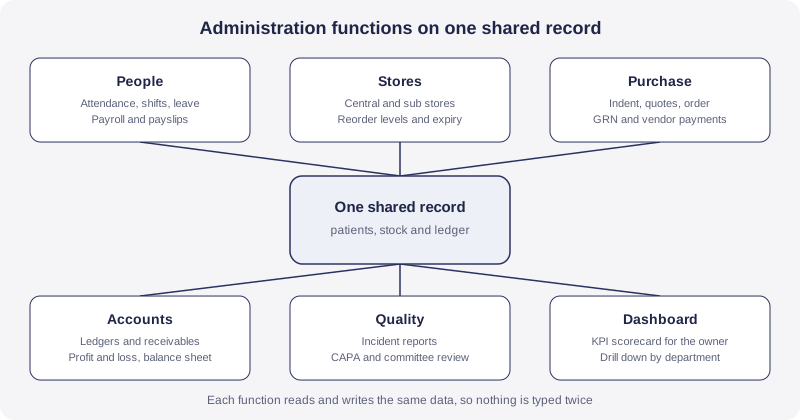
The six jobs an administrator needs software to do
Use this list to test any product. If a job is missing, ask how the hospital will do it instead, and who will do it by hand.
1. People: attendance, shifts and leave
A hospital never closes, so attendance is more than a present or absent column. You need a shift master with rotation for wards, ICU and casualty, half day and on duty marks, and leave types that match your policy. OneCity's attendance and leave module lists daily attendance (present, absent, half day, on duty), attendance from biometric or manual entry, a shift master with rotation scheduling, leave types including CL, EL, SL, ML, compensatory off and loss of pay, manager approval or rejection of leave, automatic update of leave balance, and overtime calculation.
The biometric point deserves care. OneCity is biometric device integration ready, which describes readiness and not a tested integration with every device. Every device model behaves differently, so we would test your exact device in a pilot before promising anything. Also treat fingerprint or face data as personal data. Under the Digital Personal Data Protection Act, 2023, section 7 lists processing for employment purposes among the legitimate uses, but the hospital still has to keep the data secure, and the Act provides for a penalty of up to ₹250 crore for failing to maintain reasonable security safeguards.
2. Payroll and statutory deductions
Payroll is where an error reaches every employee at once. The HRM and payroll module covers salary structure with basic pay, house rent allowance, dearness allowance and special allowances, monthly payroll processing, statutory deductions for provident fund, ESI, professional tax and TDS, payslips in PDF or print form, and an annual Form 16. The next section explains why the rules behind those deductions matter more than the screens.
3. Stores and stock
Hospital stores hold hundreds of items with different lives: syringes, gloves, linen, reagents, dressings, implants, stationery. Good stock software mirrors how the hospital already thinks. It has a central store and sub stores, receipt against a goods received note, issue to departments only against an approved indent, transfers between stores, minimum and reorder levels, and expiry tracking. The inventory management module lists all of these, along with ABC and VED analysis.
Those two analyses are worth understanding. ABC sorts items by the money they consume: A items are the small number that account for most of the spend and deserve tight control, and C items are the many low value ones that need only simple rules. VED sorts by clinical importance: vital items must never run out, essential items should rarely run out, and desirable items can wait. Together they tell a store keeper where to keep a safety stock and where a stock out is only an inconvenience. Expiry management should follow first expiry first out, so that the batch closest to its date is issued first.
4. Purchase and vendor payments
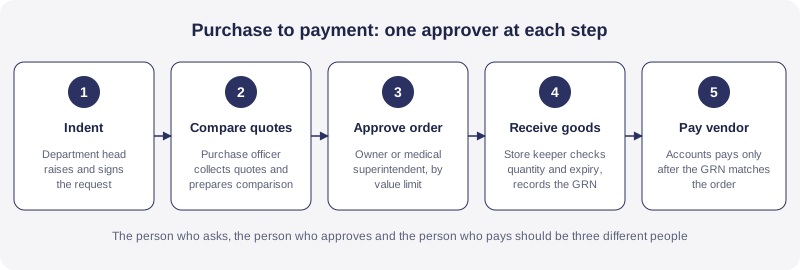
Purchase is where a hospital most needs control, because the need, the order and the payment are easy to leave with one person. The purchase and procurement module covers the whole path: a purchase indent from the department, a request for quotation to vendors, a comparative statement of rates, purchase order generation and approval, matching against the goods received note, and vendor payment tracking. GST input tax credit is part of the compliance coverage.
On GST, be careful and ask your chartered accountant. Healthcare services provided by a clinical establishment are exempt from GST, and input tax credit generally cannot be claimed on inputs used for exempt supplies. Which purchases carry claimable credit therefore depends on your mix of exempt and taxable supplies. The software should record the tax on every purchase correctly so that your accountant can decide, and it should not decide for you.
5. Accounts and reports
The accounts side should hold a chart of accounts and receivables, and produce profit and loss, a balance sheet and management reports. Some hospitals keep their books in a separate accounting package, and that is a valid choice if the hospital system can export clean data to it. The test is whether revenue in the books matches billing in the hospital system, and whether the difference is explainable. If it takes a person a full day to explain a mismatch, the two systems are not talking to each other.
6. Quality and incident reporting
Incident reporting is administration too, because the committee that reviews it is made of managers, not only clinicians. The incident reporting module supports classification into near miss, adverse event and sentinel event, an anonymous reporting option, severity scoring with a severity assessment code matrix, assignment of corrective and preventive action, and committee review. Anonymous reporting matters more than it looks. Junior staff may report a near miss more readily when they cannot be identified, and near misses are how a hospital learns before a patient is harmed.
Payroll rules keep changing, so they must be editable
Two recent changes show the point. The first is the Labour Codes. The Government of India made the four Labour Codes effective from 21 November 2025, consolidating 29 existing central labour laws, as the Press Information Bureau release explains. Three items in that release touch hospital HR and payroll directly. Appointment letters are mandatory for all workers. Fixed term employees become eligible for gratuity after one year instead of five. Employers must provide all workers above the age of 40 with a free annual health check up. A hospital can give that check up easily, but it still has to record who received it and when.
The second change is more recent. The Union Cabinet approved raising the EPFO wage ceiling from ₹15,000 to ₹25,000 per month on 16 September 2026, and the government announcement says over 51 lakh additional employees are expected to come under mandatory EPFO coverage. Many ward, housekeeping and front desk staff can sit in that pay band. Check the EPFO notification for the effective date and for how a mid month change applies to the payroll you are running now.
What this means for software is simple. A payroll module with rules fixed in code becomes a liability the day a rule changes. Ask three things before you buy:
- Can your accountant change the ceiling, the contribution rates and the effective dates without raising a ticket with the vendor?
- Does the system keep the old rule for old months? A correction to last year's payslip should use last year's rule.
- Can it recompute one month without disturbing the others?
Ask any vendor, us included, how long a statutory change takes to reach your payroll and who makes it. A clear answer is worth more than a long feature list. Professional tax also varies by state, so if your hospital has staff in more than one state, test that case in the pilot. Tax certificate formats change from time to time, so confirm the current format with your chartered accountant.
One more hospital specific point: visiting consultants and revenue share doctors are usually not salaried employees. They are paid per case, per session or as a share of collections. Ask how the software records and reports that payment, because it can be a large payout that deserves its own record.
Approvals and controls: who can do what
An approval workflow is only useful if it cannot be bypassed. That comes down to three design ideas.
Separate the three roles. The person who raises a request, the person who approves it and the person who pays for it should be three different people. This is a basic control in accounting, and small hospitals can break it without noticing when one senior person signs everything. Software can enforce it. OneCity's module pages list indent approval before stores issue material to a department, and purchase order generation with approval, which is the start of that separation.
Set limits by value. A ward sister can approve a small consumables indent. A purchase above a set amount should go to the medical superintendent or the owner. Ask whether limits can be set per role and per category, and whether approval passes to a named substitute when the approver is on leave. Without substitutes, approvals pile up or people share passwords, and both are worse than no workflow.
Keep a trail. Every approval, edit and rejection should record who, when and what changed. When an auditor or a partner asks why a purchase was made from a dearer vendor, the answer should be one screen away, not a search through files.
Access control belongs in the same conversation. Salary data should be visible only to payroll and the owner. Vendor rates should not be visible to every department. Doctors' payout figures should not be visible to other doctors. Our guide to role based access control under the DPDP Act explains how to set roles and why patient data and employee data both need it.
Reports the owner should see every month
An owner does not need forty reports. An owner needs a short page that says whether the hospital is healthy, and a way to click into the number that looks wrong. The executive dashboard module lists a hospital wide KPI scorecard, financial performance including revenue, EBITDA and collection, clinical quality metrics, operational efficiency such as bed turnover and operating theatre utilisation, and drill down by department or doctor. A separate operations dashboard shows live occupancy, revenue and turnaround time.
Whatever product you use, make sure it can produce these figures, and make sure you know how each is worked out.
| Measure | What it tells you | How it is worked out |
|---|---|---|
| Bed occupancy rate | How full the beds are | Occupied bed days divided by available bed days, times 100 |
| Average length of stay | How long admitted patients stay | Total inpatient days divided by number of discharges |
| Bed turnover | How often a bed is reused in a period | Discharges divided by average number of beds available |
| Revenue per occupied bed | Earning power of the beds in use | Total revenue divided by occupied bed days |
| Collection against billing | How much billed money actually arrived | Amount collected divided by amount billed, times 100 |
| Payroll share of revenue | Whether staff cost is drifting | Total payroll cost divided by total revenue, times 100 |
| Stock near expiry | Value at risk of being written off | Value of batches expiring within a set window |
| Open incidents | Unresolved safety issues | Incident reports without a closed corrective action |
The first four come from admissions and billing, and the rest from accounts and administration data. That is the strongest argument for one database. A dashboard on a separate tool has to import all of them, and imports go stale.
Where administration software meets NABH
If you hold or plan to seek NABH accreditation, administration data becomes audit evidence. The NABH hospital standards, 6th edition, include chapters on Human Resource Management, Facility Management and Safety, Responsibilities of Management and Information Management System, and several of them ask for records such as staff files, training and attendance records, equipment and licence registers, incident logs and review minutes. An administration system can hold some of these. The National Accreditation Board for Hospitals and Healthcare Providers publishes the standards and the current assessment process, so read the chapters yourself instead of relying on a vendor's summary.
OneCity's quality module tracks key performance indicators across chapters, and our NABH accreditation software page explains how documentation and quality tracking fit together. Be realistic, though. Software holds the evidence, but it does not run the committee meetings or train the staff. Accreditation still depends on the hospital doing the work.
Twelve questions to ask any vendor
These work on any product, ours included. Ask them in writing and keep the answers with the contract.
- Can our accountant change statutory rates, ceilings and effective dates without a vendor ticket?
- Does payroll keep the old rules for old months?
- How are visiting consultants and revenue share doctors paid and reported?
- Can attendance come from our own biometric device, and what happens on a missed punch? Ask to test the device, not to see a slide.
- Can approval limits be set by value and by role, with a substitute for absent approvers?
- Does the trail show who approved what and when, and can it be exported?
- Does purchase connect to stock receipt and to vendor payment? A goods received note should update stock and the amount owed in one step.
- Does stock show batch and expiry by store, with reorder levels?
- Do accounts, stock and billing share one database, or are they exports?
- Can the owner see a monthly report without asking someone to build it?
- Who can see salary data, and is access logged?
- What happens to our data if we leave? Ask for a full export of every register in open formats, and written proof of deletion after the export window.
Where the vendor answers with a demo instead of a sentence, ask for the demo on your data. A scripted demo with perfect sample data proves very little.
What administration software costs
Pricing models differ. Some vendors charge per user, some per bed, some per module, and some by tier. Administration modules are often sold as add ons, so ask whether HR, stores and purchase are inside the base price or extra, and whether extra branches or storage cost more. Also ask what happens to price at renewal, and get a cap in writing.
Our own module pages state that HRMS and payroll, inventory and purchase, and the executive dashboard are included from the Starter tier upward, and OneCity is free for up to 5 doctors with no setup fee and no card required. Current plans are on the pricing page. We do not quote a market average here, because published figures for hospital software vary too widely by bed count and module list to help a real buying decision. Compare two or three written quotes over five years, and count any separate payroll, stock or accounting tools you would no longer need.
How to roll it out without disturbing the hospital
Change one function at a time, and start where errors are visible and cheap to fix. Stores and attendance come first because a wrong stock count or a missed shift shows up within days. Purchase and approvals come next, once roles are set and everyone knows who signs what. Payroll comes third and always runs in parallel with the old method for one full cycle before you switch, so that any difference in a payslip is caught while the old process still exists. Dashboards and audit reviews come last, because they need clean data underneath.
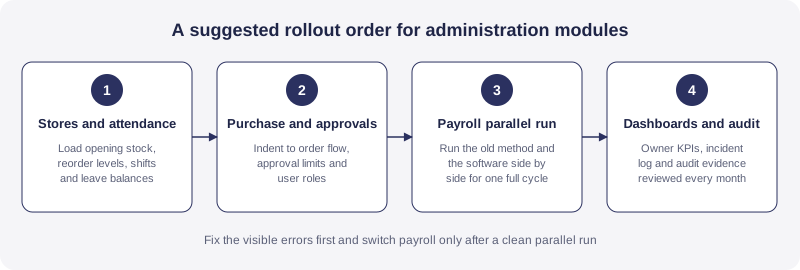
Clean the data before you load it. Remove duplicate items from the store master, reconcile opening stock physically, confirm every employee's joining date and statutory numbers, and agree leave balances in writing with each department head. Our ERP implementation timeline guide gives the wider order of work for a hospital.
A worked example: an 80 bed hospital in a tier 2 city (hypothetical)
Take a hypothetical hospital with 80 beds and around 150 staff. Stores run on registers kept by two store keepers. Salaries are calculated in a spreadsheet by an accountant who also handles purchases. The owner sees monthly numbers around the fifteenth of the following month, after the accountant has collected figures from billing, the pharmacy and the wards.
Three problems repeat. IV fluids run out on a Sunday because nobody saw the reorder level on Friday. Expired items are found during an audit, after the write off could have been avoided. And the accountant is both the person who prepares purchase orders and the person who pays vendors, so nobody can say the process is controlled.
After moving to shared administration software, the store keepers issue material against approved indents, and the system tracks each item against its reorder level, so a low item is seen before Sunday. Purchase orders need approval before they go to the vendor, and the goods received note is matched to the order before the vendor is paid. Attendance feeds payroll directly, so month end payroll is a review of exceptions instead of a fresh calculation. The owner opens the dashboard on the first of the month and asks about the numbers that look odd, instead of waiting two weeks.
None of this makes the hospital better at medicine. It removes the friction around medicine, and it makes the hospital's numbers something a partner or a lender can trust. The example is hypothetical, and your results will depend on how carefully the roles and limits are set.
When a full system is more than you need
We build an integrated product, and we still say that it is not always the answer. A stand alone tool may be enough in these cases:
- A single doctor clinic with two or three staff, where a simple attendance and expense record is all that is needed.
- A hospital whose accountant is settled in an accounting package and wants the hospital system only to supply clean reports. Ask any vendor what export they offer before agreeing.
- A hospital that has just finished a large software change and cannot absorb another one this year. Plan the administration rollout for a calmer quarter instead of rushing it.
If none of those describes your hospital, the shared database is usually worth it, because it is the only way to stop the same fact being typed in three places.
How OneCity approaches hospital administration
OneCity is a cloud hosted hospital ERP and CRM built for tier 2 and tier 3 hospitals. Administration is not a separate product. It sits in the same system as registration, OPD, IPD, billing and pharmacy, so the patient record, the stock and the ledger sit in one database. Multi branch groups can read the same data across sites, which our multi location hospital ERP page covers.
Some plain statements, since trust depends on them. OneCity has no offline mode, so a stable internet line and a downtime plan are required. Biometric attendance is integration ready and needs testing against your device. Our module pages list purchase order approval but do not describe approval limits by value or substitute approvers, so ask us to show those in a demo before you assume them. Our published module list has no dedicated equipment maintenance register, so keep that in a separate log until you have confirmed scope with us. You can try the product free for up to 5 doctors, or book a demo and bring your payroll and approval questions with you.
Frequently asked questions
What is hospital administration software?
It is software for the non clinical work of a hospital: attendance, leave and payroll, stores and purchase, approvals, accounts, incident reporting and owner level reports. In most Indian hospitals it works best as part of one hospital system that shares a database with billing and patient records.
How is hospital administration software different from hospital management software?
Hospital management software covers the whole hospital, including registration, OPD, IPD, lab and pharmacy. Administration software is the back office half of that: people, materials, money, approvals and quality. Some vendors sell it as a separate product, but a shared database means stock, salaries and revenue reconcile without spreadsheets.
Does it handle payroll and statutory deductions?
A good one should handle salary structure, provident fund, ESI, professional tax and TDS, with payslips and an annual Form 16. Statutory rules change, for example the four Labour Codes took effect on 21 November 2025, so check that your accountant can update rates and dates without waiting for the vendor.
Can a small hospital or clinic use administration software?
Yes. A small hospital gains most from stock control, attendance and a monthly report. OneCity is free for up to 5 doctors, with no setup fee and no card required, so a small site can start with stores and attendance and add payroll and purchase later.
What should the owner see in a monthly administration report?
Bed occupancy rate, average length of stay, bed turnover, revenue per occupied bed, collection against billing, payroll as a share of revenue, stock at risk of expiry and open incidents. The report should reach the owner without an accountant rebuilding it by hand.
Does OneCity administration software work without internet?
No. OneCity is cloud hosted and has no offline mode. Plan two internet lines from different providers with automatic failover, and keep paper forms for downtime, as our cloud hospital software guide explains.
Sources
Four Labour Codes made effective from 21 November 2025, Press Information Bureau (pib.gov.in). Cabinet approval of the EPFO wage ceiling of ₹25,000 per month, 16 September 2026 (pmindia.gov.in). NABH hospital standards, 6th edition (nabh.co). Module descriptions are taken from the OneCity module pages linked above. This page is general product and buying information. It is not legal, tax or medical advice and not a compliance opinion. Rules change, so verify current obligations on the relevant authority's portal, and consult a chartered accountant, a labour compliance adviser and your own counsel before you rely on any of it.
Related reading
Bring your payroll, stores and approval questions to a live demo.
Book a demo