What cloud based hospital management software actually means
Cloud based hospital management software is a hospital system that runs on servers owned and maintained by the vendor, while your staff use it through a web browser. You pay a subscription instead of buying a server and a licence. Registration, OPD, IPD, billing, pharmacy, lab and reports all sit in one database that the vendor hosts and backs up.
The label is used loosely, and the loose use costs buyers money. Three quite different products get called cloud:
- Multi tenant SaaS. Many hospitals share one running application, each with fully separated data. Updates reach everyone together. This is what most people mean by cloud.
- Vendor hosted, one instance per hospital. Your hospital gets its own copy of the software on the vendor's server or a rented one. You get more say over when updates happen, and you usually pay more for it.
- Web based software on your own server. The screens open in a browser, but the server sits in your building or on a rented virtual server that your team must patch, back up and monitor. This is on premise software with a browser front end, and it carries every on premise duty.
Ask which of the three you are being sold. The answer decides who patches the server, who restores a backup after a failure, and who answers for a security incident.
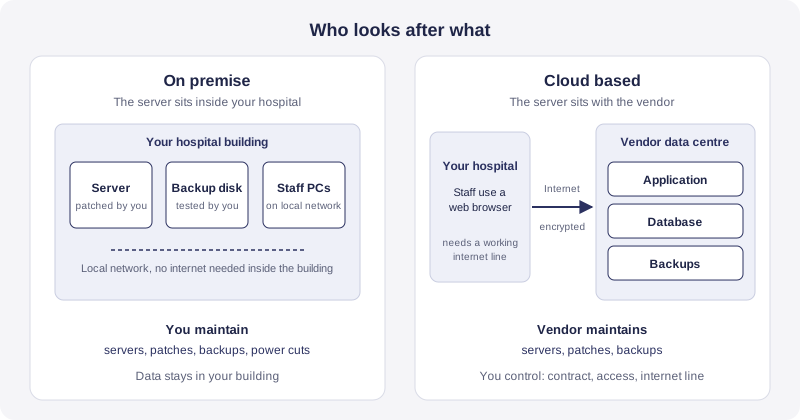
Whichever model you choose, patient data travels between your desk and the vendor's server across the public internet, protected by TLS encryption. That is normal, and it is also why the internet connection deserves its own section further down.
Cloud versus on premise: an honest comparison
Vendors on both sides oversell. This table sets out the trade offs as they actually apply to a hospital that has a small IT team or none.
| Point | Cloud based | On premise |
|---|---|---|
| Setup | Browser access and no server purchase, so a hospital can start soon after its data is ready | Server, UPS, licence and installation before first use |
| Upkeep | Vendor patches, monitors and backs up | Your team or an AMC vendor patches and backs up |
| Updates | Arrive continuously, sometimes with little notice | You schedule them, but they are often delayed for years |
| What can stop you | Your internet line and the vendor's availability | Server hardware, power and your own backup discipline |
| Data control | Data sits with the vendor under a contract, so the wording of that contract matters | Data sits in your building under your physical control |
| Cost pattern | Regular subscription, low upfront spend | Large upfront spend, then a smaller yearly maintenance cost |
| Several branches | One shared record by default | Needs VPN links or separate servers between sites |
| Growth | Add users or branches by changing the plan | Buy hardware ahead of growth |
Neither model is safer by default. A well run cloud provider often has better physical security, patching and backup discipline than a small hospital's server cupboard. A badly run one is worse than that cupboard, because your data sits with a company you cannot inspect. The difference lies in evidence, so the useful question is never whether a system is cloud, it is what the vendor can show you.
The most common on premise failure is not a cyber attack. It is a single server with a backup that nobody has ever tested by restoring it. The most common cloud failure is a hospital that signed without a downtime plan and without an exit clause. Both are avoidable, and the rest of this guide is about avoiding them.
The internet question every tier 2 and tier 3 hospital must answer first
Cloud software depends on the connection between your desk and the vendor. When the line drops, the software cannot be reached. Most cloud hospital systems have no offline mode, and OneCity is one of them: it has no offline capability and no local sync layer, and we say so plainly. If any vendor tells you their product works offline, ask them to pull the network cable during the demo.
What we did about it on our side is keep the application light. OneCity is built as server rendered pages without a single page application framework and without a build step, and it is designed to render on a 2 Mbps line. A registration desk does not need a fat connection. It needs a connection that stays up.
Build a downtime plan before go live
- Two lines from two providers. Ideally they enter the building by different routes, so one road repair does not cut both.
- Automatic failover. Use a router that switches to a 4G or 5G backup link when the main line fails, without anyone touching it.
- Power backup for the network equipment. A UPS under the desktop computers is useless if the router and the switch lose power.
- Paper downtime forms. Keep printed forms for registration, billing and prescriptions, and name one person who re enters the data the same day.
- A short drill each quarter. The front desk should have practised the switch at least once before it happens on a busy Monday.
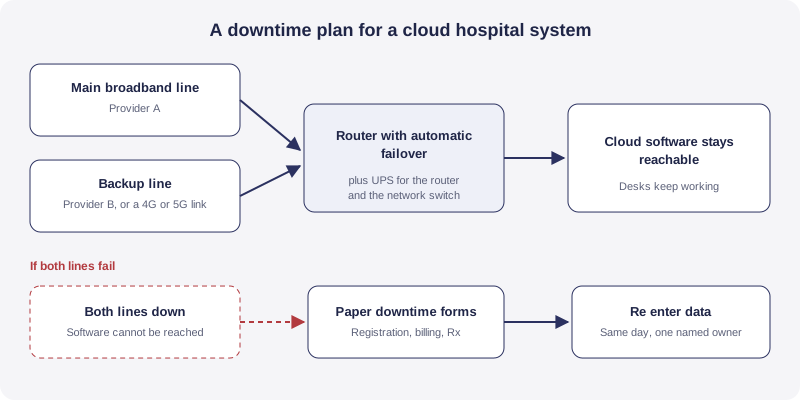
Check the numbers before you sign. Measure the real speed and stability at the exact desks where the software will run, at busy hours, for a full week. A speed test at 11 at night from the manager's office tells you very little about a crowded OPD counter at 10 in the morning.
Heavy files are a separate question
Text based screens are light. Scanned documents and radiology images are not. If your plan includes imaging, treat that traffic separately from everyday registration and billing, and ask the vendor how images are stored and retrieved. OneCity's PACS bridge is built but has not been tested against a live modality, so we describe it as PACS ready, and we would want to test against your equipment before promising anything more.
Data protection and law: what changes when the vendor holds the data
Moving to the cloud does not move responsibility. Under the Digital Personal Data Protection Act, 2023, the hospital is the Data Fiduciary and the software vendor is a Data Processor. The Act keeps the fiduciary responsible for processing done on its behalf, and a processor may be engaged only under a valid contract. In plain terms, if the vendor is careless, the hospital still answers for it.
The DPDP Rules, 2025 were notified on 14 November 2025 with an eighteen month period for phased compliance, according to the Press Information Bureau release. The Act also provides for a penalty of up to ₹250 crore for failure to maintain reasonable security safeguards. Check the notified schedule on the MeitY website for the dates that apply to your hospital, and read our DPDP Act guide for hospitals for the duties in hospital terms.
CERT-In duties
The CERT-In directions of 28 April 2022 apply to service providers, intermediaries, data centres, body corporate and government organisations. Three duties matter to a hospital buyer. Specified cyber incidents must be reported to CERT-In within 6 hours of noticing them. Logs must be kept securely for a rolling 180 days within Indian jurisdiction. System clocks must be synchronised with the Network Time Protocol servers of NIC or NPL. A cloud vendor should be able to tell you how it meets each one, and what it will do to help you if an incident touches your patients' data.
Where the data sits
The DPDP Act does not set a blanket rule that all data must stay in India. It allows transfers outside India except to countries the Central Government restricts by notification, and other sector rules can be stricter. So do not accept a vague answer. Ask for the hosting location in writing, including the backup location, and ask whether any sub processor outside India can see patient data.
Three more checks belong here. Role based access and audit trails should be on by default, which our guide to role based access under DPDP explains. Backups should be tested, not just scheduled, and the guide on hospital ERP data security and backup covers what to ask. And if you plan to exchange records under the Ayushman Bharat Digital Mission, consent handling matters, which the ABDM and ABHA integration guide covers. Our wider compliance hub lists the rest.
Twelve questions to ask any cloud hospital software vendor
These work on any vendor, including us. Ask them in writing and keep the answers with the contract.
- Where is my data hosted, and where are the backups? Get the city and the hosting provider named in the contract.
- Who owns the data? The contract should say the hospital owns it and the vendor may use it only to provide the service.
- Can I export everything, in a usable format, at any time? Ask for a sample export during the demo, covering patient master, visits, bills and lab results, not after signing.
- What happens to my data if I leave? Ask for the export window, the deletion timeline and written confirmation of deletion.
- What are the recovery targets? Ask how much data you could lose and how long a restore takes, in writing, and when the vendor last tested a restore.
- How is uptime measured, and what is the remedy? A figure like 99.9 percent means little without the measuring window and the credit owed when it is missed.
- How do you meet CERT-In duties? Six hour reporting, 180 day logs and time synchronisation should each have an answer.
- What is your position under the DPDP Act? Ask for the processor contract, the breach process and who informs patients.
- Who at your company can see patient records? Ask about staff access, the approval needed and whether access is logged.
- Do you hold an independent security certification such as ISO/IEC 27001? Ask to see the certificate and its scope, not a logo on a slide.
- What does support look like in my language and time zone? Local language help during your working hours matters more than a ticket portal.
- What happens to the price at renewal? Ask for a renewal cap in writing.
One more question has become necessary. If the product has AI features, ask which AI providers can see patient data. OneCity's AI layer uses Anthropic's Claude by default, and other model providers can be set per hospital. Whichever vendor you choose, an AI provider is one more sub processor, and it belongs in the contract and in your consent wording.
What cloud hospital software really costs
Vendors price in four common ways: per user, per bed, per module, or as a flat tier for the whole hospital. Each looks cheap for a different kind of hospital. Per user pricing suits a hospital with few staff on the system. Per bed pricing suits a hospital with high staff numbers but low occupancy. Flat tiers are easier to budget but can hide limits.
Read the offer for lines that appear later:
- Setup and data migration fees.
- Charges for each SMS or WhatsApp message sent to patients.
- Storage beyond a stated limit, which matters once scans and documents accumulate.
- Fees for each extra branch or module.
- Paid support tiers and after hours support.
- Price rises on renewal.
Compare offers over five years, and add the cost of the backup internet line and the network power backup to the cloud side. For the on premise side, add the server, the UPS, the yearly maintenance contract and a part share of a technician. We deliberately do not quote a market average here, because published averages for Indian hospital software vary too much by bed count and module list to be useful. Your own quotes are the only numbers that count. Our hospital software pricing guide explains the pricing models in more detail, and our pricing page shows ours: OneCity is free for up to 5 doctors, with no setup fee and no card required.
Moving to the cloud without stopping the hospital
A sensible cutover starts where errors are cheapest to fix. Begin with registration and billing at one counter, then add OPD consultation, then IPD and pharmacy once the front desk is comfortable. Our ERP implementation timeline guide lays out the order in more detail.
Data migration is where most delays start. Import active patients and open balances first, and keep older records readable in an archive instead of forcing a full import. Clean duplicate patients before the import, because a duplicate created in the old system becomes a permanent duplicate in the new one. The patient master and UHID is the record everything else attaches to, so it deserves the most care. If you plan to link ABHA numbers at registration, see the ABHA linkage module.
Run the old and new systems in parallel for a short period on one department, and compare a day's bills line by line. Train the front desk before the doctors, since registration errors travel furthest.
Several branches: where cloud earns its place
A group with more than one site gets the clearest benefit from cloud. Every branch reads and writes the same patient record, so a patient seen in one town is not a stranger in the next. Reports for the owner cover all sites without collecting spreadsheets. Consent captured at one branch is visible at every other, which matters under DPDP. The multi location hospital ERP page covers the wider case, and patient referral tracking shows how a referral between branches keeps its history instead of starting again. The same shared record also powers hospital CRM software for recall and reminders across all sites.
A worked example: a 60 bed hospital in a tier 3 city (hypothetical)
Take a hypothetical hospital with 60 beds, a busy OPD, and a diagnostic collection centre 12 kilometres away. It has no full time IT person. Power cuts are frequent, and the only broadband provider in the area has had two outages in a year.
On the on premise path, the hospital buys a server and a UPS, hires a technician on a maintenance contract, and connects the collection centre through a VPN. The server cupboard becomes a single point of failure, the backup runs to an external disk that sits in the same room, and nobody has ever restored from it.
On the cloud path, the hospital takes a second connection from a mobile operator with an automatic failover router, puts a UPS under the router and the switch, and keeps paper forms at each counter. The collection centre logs in through a browser and sees the same patient record. The hospital asks the vendor for a restore test result, the hosting location and an exit clause before signing.
The cloud path is not free of risk. Both connections could fail on the same day, and that is what the paper forms are for. But the failure is now short, visible and planned for, which is a better position than a server failure that nobody has rehearsed.
When on premise or hybrid is still the better answer
We build a cloud product, and we still tell some hospitals that it is not the right fit. Consider on premise or a hybrid setup in these cases:
- The site cannot get a stable connection at all, and no second line is possible. A cloud system, ours included, will frustrate you.
- The hospital already runs its own data centre with a trained IT team and prefers to keep control.
- A government or institutional policy requires data to remain on the institution's own systems.
- Imaging volumes are large enough that images should live on local storage, with only the clinical records in the cloud.
If your case is on this list, say so early in vendor conversations. A vendor who cannot discuss it honestly is showing you how the relationship will go.
How to run the evaluation
Turn the questions above into five steps and do them in this order. Skipping step three is the mistake that hurts most.
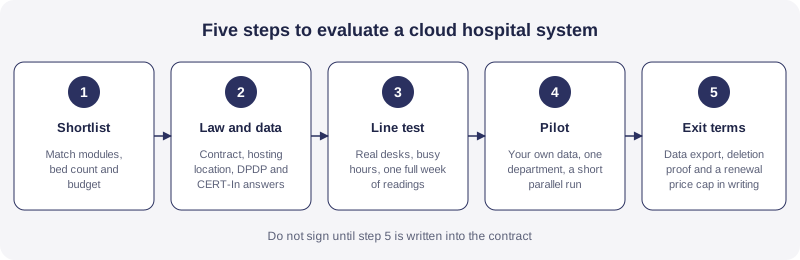
- Shortlist two or three vendors that match your modules, bed count and budget. Our comparison of hospital management software in India is a fair starting list.
- Check law and data using the twelve questions above.
- Test the line at real desks for a week before you commit.
- Pilot with your own data in one department, with a short parallel run.
- Agree exit terms covering export, deletion proof and a renewal cap.
How OneCity approaches cloud hospital software
OneCity is a cloud hosted hospital ERP and CRM built for tier 2 and tier 3 hospitals. The hospital management software page describes the whole product, and the module list shows how registration, OPD, IPD, billing, pharmacy and lab connect on one patient record. The pharmacy module, for example, works from the same patient record as the rest of the system. Related workflows have their own pages, including OPD queue management and IPD and bed management.
Some plain statements, since trust depends on them. OneCity has no offline mode. It is ABDM ready, not ABDM certified. Its PACS bridge is PACS ready and not tested against a live modality. We would rather you hear these limits from us before a demo than discover them after go live. You can try the product free for up to 5 doctors, or book a demo and bring your connectivity questions with you.
Frequently asked questions
What is cloud based hospital management software?
It is a hospital system that runs on servers owned and maintained by the vendor and is used through a web browser. The hospital pays a subscription instead of buying a server. Registration, OPD, IPD, billing, pharmacy and lab data sit in one database that the vendor hosts and backs up.
Is cloud hospital software safe for patient data in India?
It can be, but safety depends on the vendor's controls and on your contract, not on the word cloud. Under the DPDP Act 2023 the hospital stays responsible as the Data Fiduciary even when a vendor processes the data. Ask for the hosting location, backup and restore evidence, access logs, an incident process and a written data processing contract.
Does cloud hospital software work without internet?
Most cloud hospital systems do not. OneCity has no offline mode. If your site cannot keep a stable connection, fix connectivity first with two lines from different providers and automatic failover, or consider an on premise or hybrid product.
Is cloud or on premise hospital software cheaper?
It depends on how you count. Cloud moves cost from a large upfront purchase to a regular subscription. On premise adds a server, power backup, an annual maintenance contract and a technician. Compare both over five years using real quotes, and include the cost of a backup internet line for cloud.
Must hospital data stay inside India?
The DPDP Act 2023 does not set a blanket rule that all data must stay in India. It allows transfers outside India except to countries the Central Government restricts by notification, and other sector rules can be stricter. Ask the vendor for the hosting and backup location in writing.
Who owns the data in a cloud hospital system?
The hospital should own its patient data. The contract should say so, limit the vendor to using the data only to provide the service, allow a full export at any time, and require written proof of deletion when the contract ends.
Sources
Digital Personal Data Protection Rules, 2025, as announced by the Press Information Bureau (pib.gov.in). CERT-In Directions under section 70B(6) of the IT Act, dated 28 April 2022 (cert-in.org.in). Digital Personal Data Protection Act, 2023, Ministry of Electronics and Information Technology (meity.gov.in). This page is general product and buying information. It is not legal advice, not medical advice and not a compliance opinion. Rules change, so verify current obligations on the relevant authority's portal, and consult a qualified data protection professional and your own counsel before signing a vendor contract.
Related reading
Bring your connectivity and contract questions to a live demo.
Book a demo