General information for hospital buyers. It is not legal, tax or medical advice. Verify regulatory points with the relevant authority or a qualified professional. We are OneCity, so we are a competitor, and this page says so on purpose.
Who Qmarksoft is, from public sources
Qmarksoft sells software for many fields, not only hospitals. Its home page lists hospital, clinic, pathology lab, school, coaching, GST billing, MR reporting, microfinance and online exam software, plus training in web and app development. A software listing site, TechJockey, shows the company in Patna, founded in 2010, with a clinic product at ₹12,500 per license and hospital management at price on request. Qmarksoft's own pages that we read do not state a postal address, so the location and the founding year come from the listing site and not from the company.
That listing shows 4.2 out of 5 for hospital management and 4.1 for clinic management, and an overall 4.4 across all products from 51 reviews. The review count for the hospital product alone is not shown, so treat the 4.2 as a rough signal and not as proof from hospital buyers.
The hospital product page on qsoft.in lists prescription, pathology lab, pharmacy, HR and payroll, radiology, dialysis, housekeeping, service automation, inventory management and accounting. It carries a copyright line of 2022, and a demo login for the clinic product shows version 4.2.1. Pages age, and vendors update software without updating pages, so the sections below say what the pages state and say plainly when a topic is not documented.
We have not used Qmarksoft's software. Every statement about it here comes from its own public pages and from listing sites, read on 30 September 2026. If a line is out of date, tell us and we will correct it.
Side by side, on the points that matter to a hospital
The table separates what is documented from what is not. "Not documented" means we did not find it on the pages we read. It does not mean the feature does not exist.
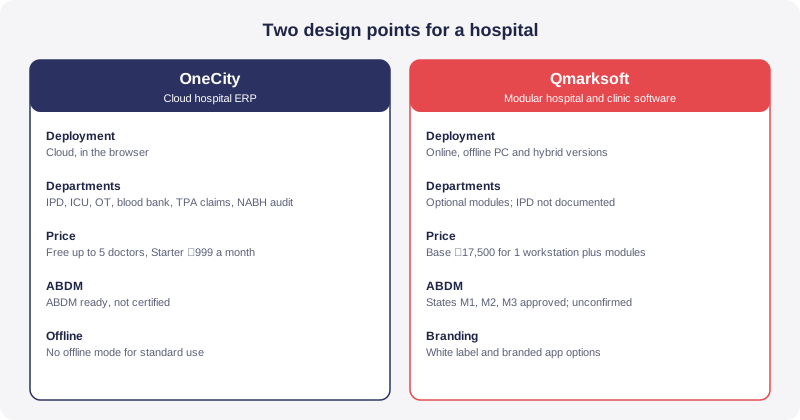
| Point | OneCity | Qmarksoft (public pages) |
|---|---|---|
| Core design point | Multi department hospital ERP | Modular hospital and clinic software from a vendor that also sells school, lab and billing software |
| Deployment | Cloud, in the browser. The pricing page lists an on premise or edge option under Enterprise | Online cloud version and offline PC version. The vendor says software is available online, offline and hybrid |
| Works without internet | Not as standard cloud use. Ask what the Enterprise option covers | Claimed for the offline PC version. We have not tested it |
| Published pricing | Free up to 5 doctors, Starter ₹999 a month, Growth and Enterprise custom, taxes extra under GST | Base plan ₹17,500 for 1 workstation, with priced modules. Billing period and GST not stated |
| IPD, wards and beds | IPD and admissions module | Not documented in the price list or module list we read |
| ICU and emergency | ICU management and emergency department modules | Not documented |
| Operation theatre and nursing | Operating theatre and nursing station modules | Optional module for OT, service scheduling and nursing station, ₹13,500 |
| Lab and radiology | Laboratory (LIS) and radiology (RIS and PACS) modules | Optional integrated diagnostic lab for pathology and radiology, ₹20,000 |
| Pharmacy | Pharmacy and drug dispensing module | Optional pharmacy module, ₹15,000 |
| Dialysis and blood bank | Dialysis unit and blood bank modules | Dialysis module ₹10,000. Blood bank not documented |
| HR and payroll | HRMS and payroll module | Optional HR and staff payroll module, ₹19,000 |
| Stores and equipment | Inventory and supply chain module. No equipment maintenance register listed | Optional inventory module with AMC and warranty alerts, ₹11,000 |
| TPA and insurance claims | TPA and insurance claims module | Not documented |
| NABH audit support | Quality and NABH audit module | Not documented |
| ABDM | ABDM ready, not certified. ABHA is in the Free plan | States "ABDM M1, M2 and M3 Approved". No ABDM line in the price list. Not independently confirmed by us |
| Own branding | Not documented | Custom domain and white label ₹15,000 (online only), branded mobile app on request ₹20,000 |
Where Qmarksoft genuinely has an advantage
A fair comparison has to say where the other side is stronger. On several points, Qmarksoft is.
Its prices are on the page
Qmarksoft's published price list names every module and its amount. You can add up a budget before a single sales call. OneCity publishes the Free and Starter prices, but Growth and Enterprise are custom by bed, doctor or usage, so a mid sized hospital gets its number only after a conversation. If you dislike that, the point is fair.
It offers an installed version
The vendor says its offline hospital software is installed on your computer. If your internet drops for hours every week, a cloud system hurts more than a desktop one, and OneCity does not pretend otherwise. Our guide to cloud based hospital software covers what an outage means for a hospital and how to prepare for one.
It lists modules OneCity does not
Qmarksoft sells housekeeping and canteen modules, and an inventory module with AMC and warranty alerts, which points at equipment servicing. OneCity's module list has no separate equipment maintenance register. If tracking biomedical equipment service dates is a priority, ask us how we would cover it, and ask Qmarksoft to show its alerts working.
It offers branding options
A custom domain with white label branding, a branded mobile app and a hospital marketplace website are all priced on its page. OneCity does not document these. A chain that wants its own name on the patient app has a reason to look at Qmarksoft.
What each system covers in a real admission
Registration and OPD billing are easy to compare, because almost every product does them. The gap shows up on the day a patient is admitted. A real admission touches many desks: the admission desk, a bed and a ward, nursing notes, doctor orders, lab and radiology, medicines issued from the pharmacy, an operation if needed, and a final bill that may go to a TPA.
In OneCity these are separate modules that share one patient record: IPD and admissions, nursing station, laboratory, pharmacy, operating theatre and TPA claims. That is the point of a hospital ERP. The bill at discharge reads from what the wards, lab and pharmacy already recorded, so nobody retypes charges.
For Qmarksoft, the base plan is described as appointment scheduling, patient registration, OPD billing, expense tracking and medical certificates. The pages we read list an OT and nursing station module, a pharmacy module and a lab module, but they do not describe IPD admission, bed allotment or discharge billing. That may only be a gap in the pages. It is also the first thing to test. Ask for a demo that takes one patient from admission to a final bill, with pharmacy and lab charges landing on that bill without re entry.
Total cost, not the list price
Here is the arithmetic, using only Qmarksoft's listed amounts. A hospital that wants the base plan (₹17,500), digital prescription (₹4,000), OT and nursing station (₹13,500), pharmacy (₹15,000), integrated diagnostic lab (₹20,000), HR and payroll (₹19,000) and inventory (₹11,000) adds up to ₹1,00,000. The pharmacy and lab modules each add a workstation, so that package covers three workstations. Add dialysis at ₹10,000 and the total is ₹1,10,000.
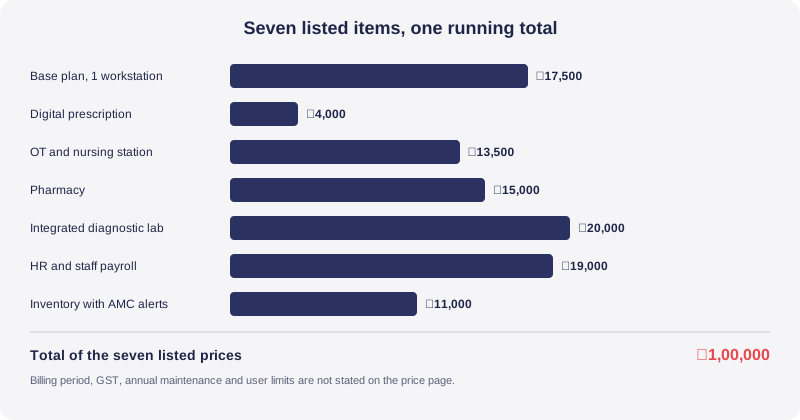
Three things are missing from the price page, and they change the real cost. The billing period is not stated, so we cannot tell whether the amounts are one time, yearly or monthly. GST is not mentioned. And annual maintenance, training, data migration and any limit on doctors or beds are not mentioned either. The page address also says clinic pricing while the list is made of hospital modules, so confirm in writing which product the prices apply to.
OneCity's side is simpler to state and harder to add up. The Free plan covers up to 5 doctors, with OPD, billing, pharmacy basics, one location and ABHA. Starter is ₹999 a month and adds IPD and wards, lab and radiology orders and a biomedical waste manifest. Growth and Enterprise are custom, and taxes are extra under GST. There is no setup fee on Free and Starter. The two price structures are not the same shape, one being a module list and the other a monthly subscription, so convert both into a three year cost once each vendor confirms its terms. Our hospital software pricing guide shows how to do that, and our pricing page has the current plans.
Online, offline and hybrid: what each means for a hospital
Qmarksoft's home page says its software is available in online, offline and hybrid versions, and its price page lists an online cloud version and an offline PC version. These words sound similar and behave differently once a hospital depends on them.
On an installed offline version, the data lives on your computer. That means backups are your job, a failed disk is your problem, and a second branch cannot see the first branch's records unless you build a way to share them. The price page lists a branch facility at ₹10,000 per added branch, so ask how that branch data is combined and how often. If the vendor calls a version hybrid, ask what syncs, when, and what happens when two people change the same record.
On a cloud system, the risk moves to connectivity and to the vendor's hosting. Ask where the data is hosted, how often it is backed up and how a restore is tested. OneCity is cloud hosted, and we do not claim an offline mode for standard use. The pricing page lists an on premise or edge option under Enterprise, and you should ask what that covers during an outage before you assume it behaves like an installed copy.
The honest summary is a trade. Installed software protects you from a bad connection and exposes you to your own backup discipline. Cloud software protects you from lost disks and exposes you to your connection.
The ABDM claim, and how to check it
Qmarksoft's hospital software page states "ABDM M1, M2 and M3 Approved". We could not find independent confirmation of that line in the sources we checked, and we are not saying it is false. In the ABDM material we read, we did not find a public list of approved products that a buyer can search, and the price list we read has no ABDM line, so it is unclear whether the capability is in the base plan or in a paid module.
M1, M2 and M3 are milestones in the ABDM sandbox process. Sources explain them differently. One vendor explainer describes M1 as ABHA creation and verification, M2 as health record exchange with consent, and M3 as wider ecosystem participation. A thread on the ABDM developer forum refers to test cases for each milestone without defining them in the text we read. Because the descriptions differ, the word "approved" alone tells a buyer little. Our ABDM and ABHA integration guide explains what a hospital needs to do on its side, and why a vendor claim is only the start.
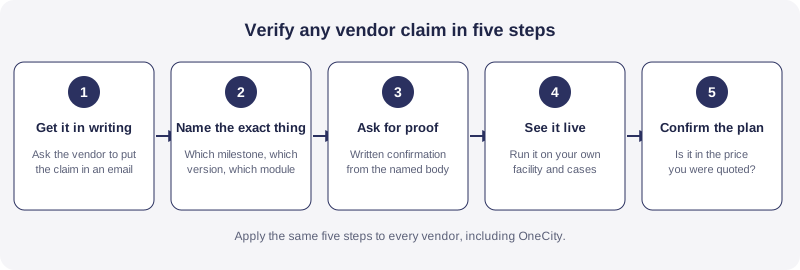
Ask for these in writing: which milestones, on which software version, confirmed by whom, and whether the capability is included in the price you were quoted. Then ask for a live demo of ABHA creation, linking a care record and sharing it with patient consent. Apply the same test to us. OneCity is ABDM ready and is not certified, and we say so on purpose.
Data ownership and switching cost
The day you leave a software vendor is the day its contract matters most. Qmarksoft's pages we read mention export to Excel and PDF. They do not state who owns the data, how backups work, or what happens to your records if you stop paying. That is a gap in what is published, not a finding about the contract.
Put the same questions to every vendor, including OneCity: can you export all records in a documented format, how long does it take, is there a fee, and what is deleted and when after you leave. Excel and PDF exports are fine for reports, but a full patient history, billing history and stock ledger need a structured export. Our guide on vendor lock in and data ownership lists the clauses to ask for.
Compliance depth
For NABH, OneCity documents a quality and NABH audit module, and our NABH accreditation software page shows how the records are organised. It also documents biomedical waste and infection control modules, and the Starter plan includes a biomedical waste manifest. The Qmarksoft pages we read do not document NABH audit, biomedical waste or infection control. If your hospital is preparing for accreditation, ask Qmarksoft how each NABH chapter is supported.
On data protection, a hospital that handles patient data has duties under the Digital Personal Data Protection Act, 2023. Failing to take reasonable security safeguards can attract a penalty of up to ₹250 crore under the Act's schedule. Neither vendor's public pages are enough to judge this. Ask for role based access, an audit trail of who opened which record, encryption and a breach process. Our DPDP Act guide for hospitals lists the questions.
Which one fits which hospital
A single doctor or a small clinic
Both are worth a look. Qmarksoft lists a clinic product at ₹12,500 per license on the listing site we read. OneCity is free for up to 5 doctors. The decision here is mostly about whether you want software on your own computer or in a browser.
A 20 to 100 bed hospital with inpatients
This is where the admission test above matters most. If wards, nursing, OT, pharmacy, lab and TPA claims must feed one bill, ask both vendors for the full admission to discharge demo, and compare what you see, not what the brochure lists. OneCity is built for this case. Qmarksoft may cover it, and its pages do not show it.
A hospital with weak internet
Qmarksoft's installed version is a real option. Confirm the backup plan first. If connectivity is patchy but not absent, a cloud system with a backup connection may still be the better trade, since a lost disk is worse than a slow day.
A multi branch group
Ask both how branch records combine, who can see what, and how reports roll up. Our page on hospital management software in India covers what a multi branch buyer should ask.
What to check if you are evaluating both
- Get the price basis in writing: one time, yearly or monthly, with GST shown.
- List the modules you need, and ask each vendor to name the module for each line.
- Run one real admission to discharge, including a TPA bill, live on your own cases.
- Ask for the ABDM proof described above, and whether it is in your quoted plan.
- Ask who backs up the data, how often, and how a restore is tested.
- Ask for a sample export of your own test data, in a structured format.
- Ask for two references from hospitals of your size and call them.
- Ask what support hours and response times are promised in the contract.
Our guide on how to choose hospital management software in India turns this list into a scored shortlist.
A note on fairness
We are a competitor, so treat this page with the care you would give any vendor's comparison. We have tried to write it the way we would want a rival to write about us: quote their own words, say what is missing from public pages, and put their strengths first. Everything about Qmarksoft comes from its public pages and two listing sites, read on 30 September 2026. We have not tested its software or spoken to its customers. The claims we cannot confirm are labelled as claims.
If you work at Qmarksoft and a line is wrong, write to sales@onecity.co.in and we will correct it. If you are a buyer, the fastest check is a live demo on your own cases from both vendors.
Frequently asked questions
Is Qmarksoft hospital software cloud based or offline?
Its public pages describe both. The home page says its software is available online, offline and hybrid, and the price page lists an online cloud version and an offline PC version. We have not tested how either behaves, so ask for a demo of the version you would buy.
How much does Qmarksoft hospital software cost?
Its price page lists a base plan at ₹17,500 for 1 workstation, with modules priced separately, for example pharmacy at ₹15,000 and the integrated diagnostic lab at ₹20,000. The page does not state the billing period or GST, so ask for the total in writing. A listing site shows hospital management as price on request.
Is Qmarksoft ABDM certified?
Its hospital page states "ABDM M1, M2 and M3 Approved". We could not find independent confirmation in the sources we checked, and we are not saying the claim is false. Ask which milestones, on which version, confirmed by whom, and see ABHA creation and record sharing live before you rely on it.
Does OneCity work offline?
OneCity is cloud hosted and we do not claim an offline mode for standard use. The pricing page lists an on premise or edge option under Enterprise. Ask what that option does during an internet outage before you assume it works like an installed copy.
Which is better for a 30 bed hospital?
It depends on your admissions workflow and your internet. If wards, nursing, pharmacy, lab and TPA billing must feed one record, run a full admission to discharge demo on both and compare. If connectivity is poor, weigh an installed version against a cloud system with a backup connection.
Can I move my data from Qmarksoft to OneCity?
Qmarksoft's pages mention export to Excel and PDF. Whether your records can be mapped depends on how they are structured. Send us a sample export and we will tell you what can be moved. Ask any vendor for that scoping in writing before you commit.
Is OneCity really free?
The Free plan is free for up to 5 doctors, with no setup fee, and covers OPD, billing, pharmacy basics, one location and ABHA. Paid plans start with Starter at ₹999 a month, and taxes are extra under GST. See the pricing page for the current plans.
Sources
Qmarksoft hospital software page (qsoft.in), Qmarksoft published price list (qmarksoft.com) and the TechJockey listing for Qmarksoft (techjockey.com), all read on 30 September 2026. ABDM milestone descriptions were read from the ABDM developer forum and a vendor explainer, and they differ from each other. OneCity plans and module names come from the OneCity pricing and module pages. This page is for general buying information only. It does not give legal, tax or medical advice, and it is not a compliance opinion. Vendors change prices, features and pages, so confirm every point with the vendor and the relevant authority before you act on it.
Related reading
Bring one real admission to a live demo and see it run from bed to final bill.
Book a demo