
Buying Guide · Implementation · 13 min read
How Long Hospital ERP Implementation Actually Takes
Published implementation timelines for hospital management software span from a few days for a small clinic to 12–16 weeks for a large multi-specialty hospital with custom workflows and legacy data migration. Most tier-2/3 hospitals switching from paper or spreadsheets land somewhere in between — realistically two to six weeks for a properly phased rollout, not the "go live tomorrow" pitch some vendors lead with, and not the six-month enterprise horror story either. This piece covers what actually determines where you land in that range, a realistic week-by-week breakdown, and the three things that blow past every estimate — written for the hospital administrator who's already been burned once by an optimistic vendor timeline and wants a plan that survives contact with an actual roster and an actual patient load.
What actually determines your timeline
Four factors do almost all of the work in setting a realistic implementation window. Data quality is the biggest one: a hospital with clean, digitised patient records migrates faster than a hospital sitting on years of handwritten registers or inconsistent spreadsheet formats, regardless of how good the software is. Module count matters directly — going live with registration, OPD, and billing is a fundamentally smaller project than launching all modules simultaneously, including IPD, pharmacy, lab, and radiology together. Staff readiness is often underestimated: a hospital with a designated internal champion who drives adoption moves faster than one where training is treated as a single afternoon session. And integration needs — connecting a lab analyser, a PACS viewer, or an existing billing system — add real time that has nothing to do with the core software itself.
Realistic ranges by hospital size
| Hospital type | Typical timeline |
|---|---|
| Solo practitioner / small clinic | Days to 1 week |
| Mid-size hospital, standard modules | 1–3 weeks |
| Tier-2/3 hospital, phased rollout | 2–6 weeks |
| Large multi-specialty, custom + legacy migration | 12–16 weeks |
These are patterns drawn from published vendor timelines across the industry, not a guarantee for any specific hospital — your actual number depends heavily on the four factors above, and a hospital with messy legacy data will run longer than this table suggests regardless of size.
A realistic week-by-week breakdown for a tier-2/3 hospital
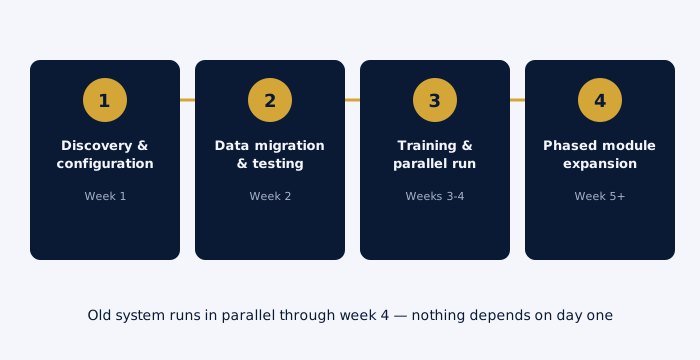
- Week 1: discovery and configuration. Confirming department list, user roles, billing rules, and which modules go live in phase one versus later. This is also when a vendor should be asking about your actual connectivity — a 2 Mbps link and an Android tablet fleet need a different rollout plan than a hospital with fibre and desktops throughout.
- Week 2: data migration and testing. Patient master data, staff records, and drug formulary get loaded and validated against a test environment before anyone touches a live patient record. This is where data-quality problems that weren't visible in week one usually surface.
- Weeks 3–4: staff training and parallel run. Front-desk, nursing, and billing staff train on the actual configured system, not a generic demo. The old system — paper or otherwise — keeps running in parallel for new entries during this period, so nothing depends entirely on a system nobody has used under real pressure yet.
- Week 5 onward: phased module expansion. Once registration, OPD, and billing are stable, additional modules — IPD, pharmacy, lab orders — roll out in subsequent phases rather than all at once, so any issue in a new module doesn't disrupt departments that are already running smoothly.
The three things that blow every estimate
Data quality issues top the list consistently across implementation guides in this space. Most hospitals sitting on years of records discover, only once migration planning starts, that the data is incomplete, duplicated across systems, or formatted inconsistently enough that automated migration can't just run and finish — someone has to manually reconcile the gaps, and that reconciliation is what actually extends the timeline, not the software configuration itself.
Staff resistance and thin training are the second recurring cause. Clinical staff are busy, and a new system that isn't clearly explained in terms of what it does for them specifically — faster charting, fewer duplicate entries, less time hunting for a paper file — gets quiet resistance that shows up as workarounds and shadow spreadsheets weeks after go-live, not open pushback during training itself.
Scope creep is the third, and it's the one hospitals do to themselves. A rollout scoped for OPD and billing that grows mid-implementation to include a custom reporting requirement, a non-standard billing workflow, or "let's also do IPD while we're at it" adds real weeks that weren't in the original plan, however reasonable each individual addition seems in isolation.
Train-the-trainer versus full-staff training: which is faster
Two training models show up repeatedly in implementation plans, and they trade off speed against depth. Train-the-trainer picks two or three staff champions per department, trains them intensively, and has them cascade training to the rest of the team over the following days. It's faster to schedule and cheaper in vendor training hours, but it depends entirely on the champions being good teachers and having time carved out from their regular duties to actually do the cascading. Full-staff training puts everyone through the same session directly with the vendor's trainer, which takes longer to schedule across shifts but produces more consistent understanding and fewer "my champion explained it differently" gaps. For a small tier-2/3 hospital with under 30 total staff touching the system, full-staff training is often actually faster end-to-end, since there's no cascade delay. For a larger hospital with multiple shifts and departments, train-the-trainer scales better despite its dependency risk.
Keeping a 24/7 department running during migration
Emergency and IPD departments can't pause for a training afternoon the way an admin office can. The practical answer is shift-based training scheduled around actual rosters, not a single all-hands session that automatically excludes whoever is on duty that day. It also means the parallel-run period matters most precisely in these departments — a night-shift nurse encountering an unfamiliar screen for the first time during an actual emergency, with no paper fallback, is the scenario every implementation plan for a 24/7 department needs to explicitly avoid. Vendors who propose training exclusively during business hours for a hospital with round-the-clock departments haven't scoped the rollout against how the hospital actually operates.
How to measure whether an implementation actually succeeded
"We went live" isn't the same as "it worked." A few concrete signals separate a genuinely successful rollout from one that technically launched but quietly failed: staff have stopped using paper workarounds or shadow spreadsheets within two to three weeks of go-live, not just on day one when everyone's paying close attention. Data entry errors and duplicate patient records are trending down, not accumulating. Front-desk registration time per patient has returned to at least pre-implementation speed, ideally faster. And support tickets or complaints are dropping week over week rather than staying flat, which would suggest staff have stopped reporting problems rather than stopped having them. Track these explicitly for the first six weeks post-go-live rather than assuming a quiet inbox means success.
Budget mistakes that trace back to timeline, not price
Some of the most expensive implementation mistakes never show up as a line item on the original quote. A rollout that runs six weeks longer than planned means staff overtime covering the gap, a longer period of running two systems in parallel with the associated double data entry, and a delayed return on whatever efficiency gains justified the purchase in the first place. Hospitals that budget only for the software and the announced timeline, with no contingency for a realistic 20–30% timeline overrun — which is common enough across the industry to plan for rather than treat as a worst case — are the ones most likely to feel like the project went over budget, even when the software itself cost exactly what was quoted.
What a vendor's implementation team should actually do
Not every vendor provides the same level of hands-on support during rollout, and it's worth knowing what to expect before assuming. A genuinely supportive implementation team helps map your specific department structure and billing rules during discovery, rather than handing over a generic configuration and expecting your staff to adapt their workflow to the software. They participate actively in data migration and validation, not just provide a CSV import tool and instructions. They run structured training sessions matched to your actual shift patterns, not a single generic webinar. And they stay reachable during the first two to four weeks post-go-live specifically, since that's when real-world usage surfaces issues a demo environment never would. A vendor whose "implementation support" is a knowledge-base link and a support email address is offering self-service, not implementation partnership — which may be fine for a simple rollout, but isn't what a multi-department hospital switch typically needs.
What to ask a vendor before you sign
A short set of questions separates a realistic implementation plan from an optimistic sales pitch. Ask for a week-by-week plan in writing, not just a single go-live date. Ask what data migration specifically includes — does the vendor's team clean and validate your legacy data, or does that fall on your staff. Ask what "go-live" actually means in their plan — is it one module or all of them, and is there a parallel-run period or a hard cutover. Ask for a reference hospital at a similar bed count who went through implementation in the last year, and ask that hospital directly how the real timeline compared to what was originally promised.
Migrating from paper versus migrating from another system
These are genuinely different projects, not variations of the same one. A hospital moving off paper registers has no structured data to migrate at all — the work is building a clean patient master from scratch as new registrations happen, which is actually faster in one sense (no legacy data cleanup) but means historical records stay on paper indefinitely unless someone commits to a separate digitisation project. A hospital migrating from an existing digital system, even a basic one, has structured data to move, which sounds easier but often isn't: the old system's field structure rarely maps cleanly onto the new one, duplicate patient records accumulated over years need reconciling, and historical billing records need to reconcile against whatever accounting system the hospital uses. Ask a vendor directly which scenario their timeline estimate assumes — a "two week implementation" quoted for a paper-based clinic and applied to a hospital migrating from a legacy digital system with ten years of records is comparing two different projects with one number.
The role of a pilot department before a full rollout
Rolling out to one department first — OPD is the common choice, since it touches every patient but has lower clinical risk than IPD or the emergency department — before expanding hospital-wide catches configuration problems while the blast radius is small. A billing rule that's wrong, a form field that's missing, or a workflow step that doesn't match how your staff actually work is far cheaper to fix when it's affecting one department's trial run than when it's live across the whole hospital. The tradeoff is calendar time: a genuine pilot period adds one to two weeks before full rollout begins. For a hospital with any tolerance for that delay, it's consistently worth it — the alternative is finding the same configuration problems during a hospital-wide go-live, at a much worse moment to be discovering them, when the whole hospital is depending on the new system working correctly from hour one.
What tier-2/3 hospitals get wrong when comparing timelines across vendors
The most common comparison mistake is taking two vendors' quoted timelines at face value without checking whether they're quoting the same scope. A "one week" quote that covers only registration and billing isn't faster than a "three week" quote that includes IPD, pharmacy, and lab from day one — they're different projects wearing the same unit of measurement. A second mistake is not asking whether the quoted timeline includes staff training time or assumes your staff will absorb training on their own schedule outside the project timeline. And a third is treating a vendor's fastest-ever implementation, mentioned as a highlight case study, as the expected outcome rather than the best case — ask specifically for the median timeline across their last ten hospitals at a similar size, not the fastest one they're proud of.
Why offline-first design changes the calculus for tier-2/3 hospitals
A hospital built for reliable fibre and desktop workstations everywhere faces a very different implementation reality than a tier-2/3 facility running on a 2 Mbps connection with an Android tablet fleet and occasional outages. Software designed and tested primarily for high-bandwidth environments tends to surface connectivity-related problems only after go-live, when the gap between the demo environment and the real hospital network becomes obvious. Software built offline-first from the start — where a tablet can keep working through a connectivity drop and sync when the link returns — avoids an entire category of go-live surprises that otherwise show up in week two or three as "the system is slow" complaints that are really "the system assumed bandwidth we don't have" problems.
Where implementation timing connects to other decisions
Implementation timelines also intersect with specific compliance goals worth planning for upfront. Hospitals building toward NABH accreditation should factor assessment-readiness into their rollout plan rather than treating it as a separate project afterward. If medico-legal documentation is part of your rollout scope, see our guide to MLC register software. And for hospitals still deciding on the underlying platform before timeline planning even starts, why tier-2/3 hospitals need a unified ERP covers that platform decision directly, with the full module list showing what's actually being implemented at each phase.
How OneCity approaches implementation
OneCity's rollout follows the phased pattern above deliberately, not by accident: registration, OPD, and billing first, since those touch every patient and every rupee collected, with IPD, pharmacy, lab, and the remaining modules following once the first phase is stable. The patient registration and OPD consultation modules are typically first to go live, syncing with billing and revenue cycle from day one. Because the platform is offline-first by design, tablets used at a nursing station or in a rural outreach camp keep functioning through a connectivity gap and sync automatically once the link returns — the exact scenario that derails a rollout built for constant connectivity.
For hospitals evaluating what a realistic quote should include, our guide to hospital software pricing in India covers what implementation and training costs to expect as part of a real vendor comparison, and how to choose hospital management software in India covers the broader selection criteria beyond timeline alone. For the specific offline-first design decisions behind OneCity's platform, see why hospital ERP for tier-2/3 hospitals must be offline-first.
None of this is meant to talk anyone out of switching systems — it's meant to replace an optimistic single date with a realistic plan, since a hospital that goes in expecting six weeks and a phased rollout ends up far less frustrated than one that was promised three days and hit six weeks of surprises instead. The timeline itself rarely determines whether an implementation succeeds. Whether the plan matched reality from the start does, and that plan is worth demanding in writing before any contract gets signed, from OneCity or from anyone else you're evaluating.
Frequently asked questions
How long does hospital software implementation usually take?
Published vendor estimates range from a few days for a small clinic on a cloud system to 12–16 weeks for a large multi-specialty hospital with custom workflows and legacy data migration. Most tier-2/3 hospitals fall somewhere in the two-to-six-week range for a well-scoped rollout.
What's the single biggest cause of implementation delays?
Data quality problems, consistently. Years of patient records that are incomplete, inconsistently formatted, or duplicated across old systems take longer to clean before migration than almost any team expects going in.
Can a hospital keep running during the switch?
Yes, with a phased rollout and a parallel-run period where the old and new systems operate side by side for new entries. A big-bang cutover with no parallel period is where most patient-care disruption actually happens.
Does OneCity require all 120 modules to go live at once?
No. A phased rollout starting with registration, OPD, and billing, then adding IPD, pharmacy, and lab in subsequent phases, is the realistic path for most tier-2/3 hospitals rather than a single all-modules cutover.
Should a hospital run a pilot department before rolling out everywhere?
For most hospitals, yes. A one-to-two-week pilot in a single lower-risk department, typically OPD, catches configuration mistakes while the impact is contained to one team rather than the whole hospital. The calendar cost is real, but it's consistently smaller than the cost of finding the same problems during a full go-live.
Sources and further reading
Implementation timeline patterns referenced in this piece are drawn in part from a hospital management software implementation overview published by Birlamedisoft, and from a week-by-week HMS implementation guide published by SHM Solutions. Every hospital's actual timeline depends on its specific data, staffing, and scope — confirm a concrete plan with any vendor before treating a published range as a commitment, and ask specifically how each source arrived at its numbers, since methodology varies as much as the estimates themselves.
Get a realistic timeline for your hospital, not a generic one
Free up to 5 doctors. No card, no setup fee.
Book a demo See pricing